brainstorming
brainstorming
You MUST use this before any creative work - creating features, building components, adding functionality, modifying behavior, or planning anything new, in software or out of it (a talk, a business, a renovation).
ui-testPlain English E2E UI testing. Describe tests in natural language, agent executes via browser tool, then exports real Playwright test scripts for CI/CD. Use when asked to create UI tests, test a website, or generate Playwright scripts.
Independent GitHub snapshot · Automated classification · Original documentation governs
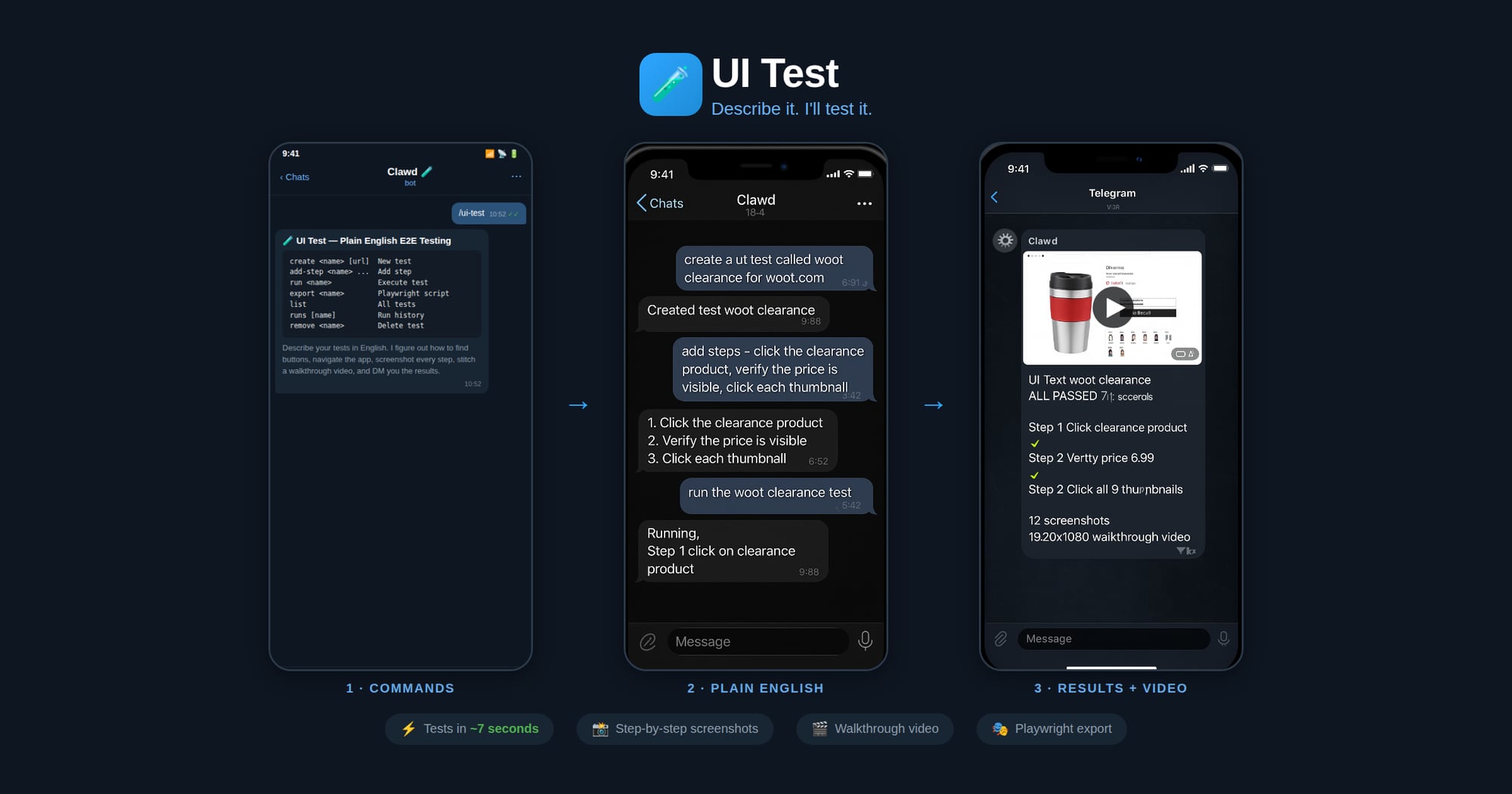
Describe your UI tests in plain English. The agent figures out how to find buttons, navigate the app flow, and execute each step — no selectors or code needed. It screenshots every major step, stitches them into a walkthrough video, and DMs you the result with a pass/fail report.
Made in 🤠 Texas ❤️ PlebLab
.spec.ts from the verified stepsnpx playwright testWhen running a test:
node scripts/ui-test.js get "<name>"browser action=start profile=clawdbrowser action=snapshot to see the page
c. Use browser action=act with the appropriate request (click/type/press/etc.)
d. Take a screenshot after each step
e. Record what selector/ref was used and whether it passednode scripts/ui-test.js save-run "<name>" passed=true/falseWhen exporting to Playwright:
.spec.ts file with proper imports, test structure, and assertionsThe agent should interpret plain English steps like:
| User says | Browser action | Playwright equivalent |
|---|---|---|
| "click the Sign In button" | act: click ref="Sign In button" | page.getByRole('button', {name: 'Sign In'}).click() |
| "type hello@test.com in the email field" | act: type ref="email" text="hello@test.com" | page.getByLabel('Email').fill('hello@test.com') |
| "verify the dashboard shows Welcome" | snapshot + check text | expect(page.getByText('Welcome')).toBeVisible() |
| "wait for the page to load" | act: wait | page.waitForLoadState('networkidle') |
| "click the hamburger menu" | act: click (find menu icon) | page.getByRole('button', {name: 'menu'}).click() |
| "scroll down" | act: evaluate fn="window.scrollBy(0,500)" | page.evaluate(() => window.scrollBy(0, 500)) |
| "check the Remember Me checkbox" | act: click ref="Remember Me" | page.getByLabel('Remember Me').check() |
| "select 'USD' from the currency dropdown" | act: select values=["USD"] | page.getByLabel('Currency').selectOption('USD') |
| "take a screenshot" | browser action=screenshot | page.screenshot({path: 'step-N.png'}) |
| "verify URL contains /dashboard" | check current URL | expect(page).toHaveURL(/dashboard/) |
Run via: node ~/workspace/skills/ui-test/scripts/ui-test.js <command>
| Command | Description |
|---|---|
create <name> [url] | Create a new test |
add-step <name> <step> | Add a plain English step |
set-steps <name> <json> | Replace all steps |
set-url <name> <url> | Set the test URL |
get <name> | Show test definition |
list | List all tests |
remove <name> | Delete a test |
save-run <name> ... | Save execution results |
runs [name] | Show run history |
export <name> [outfile] | Export as Playwright script |
Generated Playwright files include:
test.describe block with test nametest.beforeEach with navigation to base URLDuring test execution, the agent should:
step-NN-before.jpgstep-NN-after.jpgstep-NN-FAIL.jpgScreenshots are saved to: ~/.ui-tests/runs/<slug>-<timestamp>/
After the run completes, generate a walkthrough video:
ffmpeg -framerate 1 -pattern_type glob -i '~/.ui-tests/runs/<folder>/step-*.jpg' \
  -vf "scale=1280:-2" -c:v libx264 -pix_fmt yuv420p -y output.mp4
Then send the video to the chat.
~/.ui-tests/<slug>.json~/.ui-tests/runs/<slug>-<timestamp>/run.json~/.ui-tests/runs/<slug>-<timestamp>/step-*.jpg~/.ui-tests/runs/<slug>-<timestamp>/walkthrough.mp4./tests/<slug>.spec.ts